Tuesday, December 11, 2007

Automating file copying with Windows Mobile and Powershell

My needs

My primary use of pocketpc is reading articles somewhere in underground on the way from r1 home to work and opposite. So I need some way to get data in my PDA. The way that advocates by something like iPhone or BlackBerry is direct connect from PDA to Internet.

My problems

But the problem that here, in Russia, we don't have this option. Internet connection by cellular networks are very expensive and r2 works not as well as wish. It has some reasons - mobile communication market here was saturated not so long ago and companies not think yet about Internet as way to increase revenue but their networks already overbusy. Wi-Fi is not widespread enough.

My choice

So I need some other way. In my case I prefer to save some interesting and big enough articles from morning newspaper and blogs to PDA's memory. And here I also have some choices to solve task. In my particular case I need to copy data to PDA a few times for a day from two computers - at home (when I'm going to work) and at work (when to home). So previously I use the following scenario:

r3

Surfing the web, reading mail I save interesting on memory card (or in directory and later copy to card) on PC through additional card reader or with embedded reader in notebook.

New problems

I was happy with this scenario but recently I changed my 2 gb capacity card to 4 gb capacity. This cause that card reader which I use for PC is no longer can help me - it doesn't understand my new card. So I have to enhance my scenario.

r4

While with notebook I work as earlier - from PC I copy directly to PDA. It means that I use dock station which come with my PDA. It's a bit interesting thing - when you connect this dock to your PC the tool called ActiveSync (or WMDC in vista) simulate your PDA as new disk in the system.

r5

But it's not truth - you can't access it with traditional I/O - you need to use special interface called RAPI. So if I previously in my Powershell script just move files from one storage to another then now I need to rewrite my script to work with RAPI.

It's may be the best thing about Powershell - if you use old cmd.com for scripting or even cygwin you can't access RAPI so simple - and with Powershell I can just use .NET wrapper around RAPI.

And here it is

As you can see this script contains Exception handling technique which different from usual in modern OO languages. It can seems to be not very necessary here, but it gives us opportunity to check problems when for some reasons (like no more free memory) we can't copy one file and hence must not delete it from PC - but still can copy smaller size file.

As for the rest we loads wrapper-library check device, check connection and copy files, when we can't connect we use another .NET library called Windows.Forms to show MessageBox about it.

[System.Reflection.Assembly]::LoadFrom("D:\work\powershell\OpenNETCF.Desktop.Communication.dll")| Out-Null $rapi = New-Object OpenNETCF.Desktop.Communication.RAPI $desktopPath = "C:\Documents and Settings\username\Desktop\2read\" $devicePath = "\SD-MMC card\docs"; echo "Connecting to device..." Function ConnectDevice(){ if($rapi.DevicePresent) { $rapi.Connect() } Write-Output $rapi.Connected } Function CopyFile($rapi,$file){ $script:copiedSuccessful=$true trap [Exception] { Write-Host Write-Error $("TRAPPED: " + $_.Exception.GetType().FullName); Write-Error $("TRAPPED: " + $_.Exception.Message); $script:copiedSuccessful = $false continue; } $deviceFile = $devicePath+"\"+$file.Name echo $file.FullName to $deviceFile $rapi.CopyFileToDevice($file.FullName,$deviceFile,$true) if($script:copiedSuccessful -eq $true) { Remove-Item -Path $file.FullName -force -verbose } } Function CopyFiles($rapi){ $files = Get-ChildItem -Path $desktopPath -recurse if($files -ne $null){ foreach($file in $files){ CopyFile $rapi $file } } else { echo "NO FILES FOUND" } } if(ConnectDevice){ CopyFiles($rapi) } else{ [System.Reflection.Assembly]::LoadWithPartialName("System.Windows.Forms")| Out-Null echo "NOT CONNECTED!" [System.Windows.Forms.MessageBox]::Show("NOT CONNECTED!") }

Wednesday, December 5, 2007

Tools matter... sometimes

Commonly used in out team tool for SQL database works:

t2

and new for us tool that I test for some time:

t1

This screenshots are tree(or explorer)-like view of the same database (not our, db that we must integrate) at the same time. Do you see difference? Second tool show us in tree that one trigger is disable by shading icon, first can say us that only when we open that trigger (so to find that trigger from GUI we must open all).

It's a very little thing, but sometimes (as today) it's very helpful. Today we have a bug in that system. The first idea was that problem somewhere in trigger, but when try test this (by disable) not help to stop system fall. But problem was there! Developer just made mistake and disable not that trigger. And when I open second tool I notice that straight away.

So, don't believe people saying tools are unimportant, sometimes they wrong - and that times can give you a lot of headache, do you need that?

Sunday, December 2, 2007

Windows Live Writer install failed

Live Writer is definitely best windows tool for blogging. But as wellWriter_OverviewBeach_Graphic as many other ms products it has some bugs which with non-transparent behavior annoy some people.

So I have 2 problems with Live Writer.


Install failed

With release of version 2008 you must install LiveWriter from united Live installer - which downloads needed software during installation. And on my home PC it says failed without any additional information.

Workaround for problem - download installer, that contains writer - from here:

http://get.live.com/wl/all

Just select writer.

(400) Bad Request when upload post with images in blogger

The problem appears when post image through clipboard or in .png for example. So workaround - save images to disk in .jpg before add it to draft.

more about - here

Monday, November 5, 2007

Windows desktop GUI testing and file dialogs

In most cases development of desktop GUI applications are much more pleasant than web-development (yes, today with JS libraries, it can be disputted, but I win in that contest ;)) . But... one case of development - functional testing - was never been easier in desktop development than in web development.

Just because of application nature. When you have markuped interface - you can easy write code to check whether you web page has needed tag (control) or not and other operations. Tools like Selenium, Watir or something else can provide you good framework to do such thing in transparent way. It much more difficult in your OS - you need to find your form by name, find needed control - often by-hand. Yes, for a long time big companies sold automated GUI-test tools (like IBM Rational or Mercury). But your know, i don't like tools like this - it's operations often non-transparent, non-reliable, non-customizable, complicated to add in build process n etc.

So, until recently, I often prefer not to test GUI-code. And know i do it with NUnitForms. Because it's awesome - just think - it can test Windows native modal dialogs like MessageBox or FileDialog!

You can read about it here or here.

One note that I can add to this is explanation of strange behaviour of windows file dialogs. Unlike MessageBox file dialogs in windows initially have "Open" title - not your own. So for that case NUnitForms has special ExpectFileDialog method, which do nothing more than set modal dialog name to Open.

So your code look like this:


1 ExpectFileDialog("CancelSaveDialog");


1 public void CancelSaveDialog() 2 { 3 HandleSaveFileDialog(delegate(SaveFileDialogTester tester) 4 { 5 tester.ClickCancel(); 6 }); 7 } 8 9 public void HandleSaveFileDialog(Action<SaveFileDialogTester> action) 10 { 11 SaveFileDialogTester fileDialogTester = new SaveFileDialogTester("Select backup file"); 12 action.Invoke(fileDialogTester); 13 }

This code works fine on my notebook, but failed on some other computers. The cause is system locale. On my notebook i have english locale, and other computers has Russian locale - and File Dialog opens with not "Open" title but with "Открыть" (open in russian) title.


So, I decline ExpectFileDialog in favor with ExpectModal with my selection of needed title:


1 CultureInfo culture = CultureInfo.CurrentUICulture; 2 3 string saveFileDialogWindowsCaption = culture.TwoLetterISOLanguageName=="ru"?"Открыть":"Open"; 4 5 ExpectModal(saveFileDialogWindowsCaption, "OkSaveDialog");

But maybe any we can directly get dialog name in windows?

Wednesday, October 24, 2007

Just pretty

Recently, I work on export/import for one application. I implement some features - select importer, file for import, and etc.

All tests worked fine, but when I try use import in working application, something goes wrong.

It should be noted that app in some cases use embedded db (sqlite) for store data. Data Layer can't save imported data, with very strange error:

"SQLite error no such table: foo SQLiteException caught."

I check db schema, test saving with not imported data - and sink into process with debugger.

And when I face up to feel miserable - I found answer:

http://sqlite.phxsoftware.com/forums/p/478/2031.aspx

Saturday, September 29, 2007

.Net Code Metrics

While .Net platform in most spaces have good open source and commercial tools, recently I found that .net lacks good code metrics tools. In my particular case I only want to see basic things (like LOC or inheritance level) of little home investigations done in last month. When I search google for such tools only what I found is commercial NDepend, simple devMetrics and Reflector's plugin.

NDepend is awesome tool, not just code metrics, it has many other features. But it's too expensive ($400 per license) and has no any free edition.

devMetrics seems to be abandoned project with not very friendly site, so I didn't try it.

Reflector is famous .net class viewer. It has good metrics add-in.

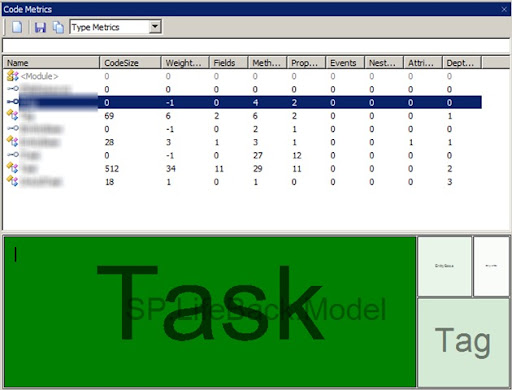
reflectormetrics

I use it found that it enough interesting, it looks like free young brother of NDepend. The problem that some of generated indices are unintelligable. What is CodeSize? It's not the number of code lines but what?

And today with port my project to Orcas I finally found what I want.

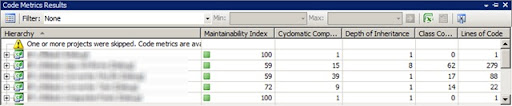
VSTS 2008 has Code Metrics! Just look:

vs9codemetrics

I consider of use Team Suite now ;)

Tuesday, September 11, 2007

Xml in VS with Resharper

In the early 2000-s XML was one of the technologies, wondered the developer community.

Today, with all of that RoR,JSON n etc. XML has become thing, that many people dislike. But also, it's for now sufficiently mature.

In this world (java/.net) today when it has no attribute/annotation use, xml is choose for configuration in most cases. So NHibernate or Spring use it.

Visual Studio has enough good support for XML (if you not forgot place your *.xsd in Schemas folder) - except one thing. When you want to create new mapping for class you need to manual write whole namespace for it.

And now, with ReSharper you can complete you class name in XML.

Just press Ctrl-Alt-Space. You see:

resharperxml1

And you get:

resharperxml2


But assembly name you need to add by hand:

resharperxml3


As Ilya Ryzhenkov mentioned in comments, ReSharper has context action for complete module qualification.

 resharperxml4

Click yellow light bulb or press Alt-Enter:

resharperxml5

And you'll give:

resharperxml6

It's almost cool, only what I want is ability to  add only assembly name, not full qualification.

Wednesday, August 15, 2007

Spring.net Common Logging for Testing

del.icio.us Tags: , , ,

Commonly, we use log4net for unit testing in .net, because of it's standard log4j-like style. But sometimes it seems that log4net not stress-effective, so remove dependency on it is right decision. In .net there isn't any widely adopted library for this like Jakarta's Commons Logging, so as we use Spring.net for DI, we use it's Common Logging library, which let us decoupling from log4net.

One thing that we not understand immediately is that how to configure logmanager in unit tests.

In log4net (as well as log4j) you can simply use BasicConfigurator:

1 BasicConfigurator.Configure(); 2 3 LogManager. 4 GetLogger(typeof(C1DocC1DirectDAOTest)). 5 Debug("LOGGING SETUP");

But using it with Common Logging has no effect. Right way is setting adapter for LogManager.

1 NameValueCollection properties = new NameValueCollection(); 2 properties["level"] = "Debug"; 3 4 Common.Logging.LogManager.Adapter = 5 new ConsoleOutLoggerFactoryAdapter(properties); 6 7 Common.Logging.LogManager.GetLogger(typeof (C1DocC1DirectDAOTest)). 8 Debug("SPRING LOGGING SETUP");

Other implementations can be found in doc.

Tuesday, August 14, 2007

Known facts and delusions about football

Wikipedia's page on football has very interesting map about popularity of football around the world.

Description for it is simple - in green countries football are sport number 1 and red - not. In this nothing interesting, in australia it's rugby, usabasketball, india/pakistan - cricket, canada and finland - ice hockey, in china competitor of football is Ping Pong i think.


More interesting is saturation. Ok, we all know that USA is most sports nation, but did you ever think that per 1000 people in USA more players than in Brasil or Argentina?