with-stream

Tuesday, September 29, 2009

Debug Windows Mobile applications on real device

amplitude_websiteimage

Highly recommend this article - rare type of article about migrating real-world application from one platform – iPhone - to another - windows mobile, great in comparing and adopt different approaches to development. 

So one of things that I realized only when reading this article - is that we can debug Windows Mobile applications on real device, connected to desktop, not in emulator, and it’s very helpful.

It’s easy – between various emulators in default devices setting for project we have “Windows Mobile 6 Professional Device” – and it works fine.

image

Thursday, September 17, 2009

Nested (inner) object initializers

Object initializers are probably most usable feature from C# 3 in my daily work. It was adopted by me since the beginning but only today I found that its support nesting, look:

var edit = new TextEdit();
edit.Name = "passwordEdit";
edit.Properties.PasswordChar = '*';

It's simple but real code, without initializers, how we can improve it? Before today's knowledge only like this:

var edit = new TextEdit{
   Name = "passwordEdit"
}
edit.Properties.PasswordChar = '*';

Because we can't write:

var edit = new TextEdit{
   Name = "passwordEdit",
   Properties.PasswordChar = '*'
}

And now, proper syntax:

var edit = new TextEdit{
   Name = "passwordEdit",
   Properties = {
                        PasswordChar = '*'
                }
}

Awesome. I hope some day we can attach event handlers with object initializers like Miguel de Icaza proposed.

Friday, September 11, 2009

GAC GUI/.Net 2.0 Configuration

It appears that if we go to Control Panel\Administrative Tools – we found tool called Microsoft .NET Framework 2.0 Configuration.

And with this tool has GUI for work with GAC – list, register, unregister - without need to use gacutil. I think sometimes (and for some people :)) it may be very helpful – while console utils is right way, of course.

11.09

Thursday, September 3, 2009

Real world refactoring

I often find code like this in some projects:

      public bool ShowDialog(object view, string title)   
      {   
		  //some code   
  
          var window = GetWindow(control,title);   
  
		  //some code   
  
          using (container)   
              return (bool) window.ShowDialog();   
      }   
  
		/////////////////////////////////////////   
		// a lot code between   
		/////////////////////////////////////////   
  
      public void Show(Control view, string title)   
      {   
    	  //some code   
  
          var window = GetWindow(view, window);   
  
    	  //some code   
  
          window.Show();   
      }   
  
		/////////////////////////////////////////   
		// a lot code between   
		/////////////////////////////////////////   
  
      private Window GetWindow(Control control, string title)   
      {   
            var window = new Container(control);   
  
			//doings something else with container, like:   
           
        	window.Text = title;   
  
	        return window;   
      }  

I this case Show and ShowDialog have really different logic and not well suitable for functional-style as I think, that’s not the case.

The case is method GetWindow itself – it is like situation when solving one problem you creates another.

As I think developer has following code:

      public bool ShowDialog(object view, string title)   
      {   
		  //some code   
  
		  var window = new Container(control);   
  
	 	  //doings something else with container, like:   
           
          window.Text = title;
  
		  //some code   
  
          using (container)   
              return (bool) window.ShowDialog();   
      }   
  
		/////////////////////////////////////////   
		// a lot code between   
		/////////////////////////////////////////   
  
      public void Show(Control view, string title)   
      {   
    	  //some code   

		  var window = new Container(control);   
  
	 	  //doings something else with container, like:   
           
          window.Text = title;   
   
    	  //some code   
  
          window.Show();   
      }   
 

His intention was to remove code duplication and it’s right, but… But He prefer to “Extract method” GetWindow, which give us code that we have. Yes, this is one way to do, but it’s not best, because in this case when somebody wants to read or edit this code it’s a very annoying. You need to switch your view between such “Top-level” public method and that “Extracted” private methods, it’s in such big class, especially bad when you have several methods like GetWindow. You just violates SRP.

You can avoid it really easy – you have 2 alternatives:

First

Just overload constructor of Window and implement all you need there:

      public bool ShowDialog(object view, string title)   
      {   
		  //some code   
  
          var window = new Container(control,title);   
  
		  //some code   
  
          using (container)   
              return (bool) window.ShowDialog();   
      }   
  
		/////////////////////////////////////////   
		// a lot code between   
		/////////////////////////////////////////   
  
      public void Show(Control view, string title)   
      {   
    	  //some code   
  
          var window = new Container(view, window);   
  
    	  //some code   
  
          window.Show();   
      }   
  
//Container.cs:

      public class Container
      {   
			public class Container(Control control, string title, /*any other params you need to set it properly */)
			{
				//doings something you need
           
        		window.Text = title;   
  
				//doings something you need
			}
      }  

Second

The bad thing of first way is that 1) You can have no access to/can’t inherit from class Container 2) You can hides some logic in Container which not natural to class Container. If one of these, or both – create Factory:

	  IContainerFactory containerFactory; 

      public bool ShowDialog(object view, string title)   
      {   
		  //some code   
  
          var window = containerFactory.Get(control,title);   
  
		  //some code   
  
          using (container)   
              return (bool) window.ShowDialog();   
      }   
  
		/////////////////////////////////////////   
		// a lot code between   
		/////////////////////////////////////////   
  
      public void Show(Control view, string title)   
      {   
    	  //some code   
  
          var window = containerFactory.Get(view, window);   
  
    	  //some code   
  
          window.Show();   
      }   
  
// ContainerFactory.cs:

      public class ContainerFactory
      {   
			public Get(Control control, string title, /*any other params you need to set it properly */)
			{

				//doings something you need
           
	        	window.Text = title;   
  
				//doings something you need

			}
      }  

Tuesday, August 25, 2009

Little gem and back to school

Do you know how Double.IsNan() implemented?

public static bool IsNaN(double d)
{
    return (d != d);
}

From stackoverflow. The same for java.

It’s really funny when you find something like this. You find it when you not really need it, just try quick way to remove noise data – starts with zeros, then found you need to remove NaNs – and catch this. Firstly it’s impressive – a few moments later you understand that it’s proper, it’s just from school’s math and logic, nothing more but you enjoy this moments…

Monday, January 28, 2008

Visual Studio for Internationalization and Localization

Every new platform, every not mature platform has common set of problems and one of this problems are probably will be Internationalization (I18N) and Localization support. For big part of development world it's not problem - if you are write solely for your country or you speak in English - and so you may be never think about it. But if you speak in different language and think of broader market for your product - or just want to create UI in the same terms as domain model - I18N is your headache.

So if you think that Visual Studio is mature product - you are wrong - every mature development product must know of Localization problems and give you full set of tools to do it.

Localize Forms

Ok, Visual Studio Forms Designer give your ability to localize forms - it's good enough.

Just

  1. Set Form's (or Control) Localizable property to True
  2. Choose your language in Language property
  3. And in the form's design view translate all that your need.
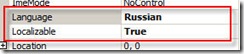
loc1

And that's all - good.


But designed controls are not all strings in UI interactions. When you show messages to user or create control dynamic you also need localize UI.

How? By extract strings to resource (the same as Form Designer do for forms).

For instance - all major java IDE has ability for this:

Eclipse:loc2
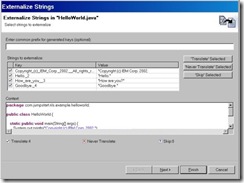
IntelliJ IDEA: http://www.jetbrains.com/idea/features/i18n_support.html


But not Visual Studio!

With visual studio you don't have way to externalize your string to resources without many manual work... to present day.

Now we have two very good add-ins for it.

Resource Refactoring Tool

Resource Refactoring Tool is a free add-in for Visual Studio that gives your ability to extract hard-coded strings to resource.

Select text, from context menu select Refactor->Extract to Resource (or use Ctrl-R, Ctrl-X shortcut):
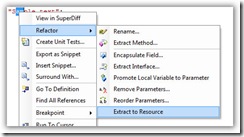
RefactoringTool-Menu

Than select resource file where you want to extract and refactor parameters:
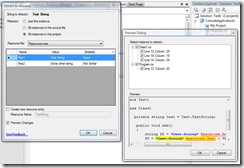
RefactoringTool-Window

So then you must copy your resource file to resource file for localization - for instance if you have Resources.resx you need to make copy with name Resources.ru.resx (where ru - is your language postfix - de, pl n etc.).
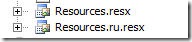
loc3

And then in Resources.ru.resx translate parameters to needed parameters.
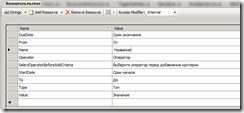
 loc4

Good enough.

One problem is that when you extract string to resource and you already have localized version of that resource - you must manually create new variable in localized file. For example with IDEA you don't need to do this:
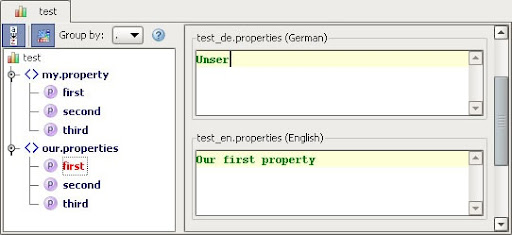
resource_bundle_editor

safedevelop's RGreatEx

loc6

Another tool for that is Commercial plugin for other great development tool - Resharper (plugin for VS) - RGreatEx (30 Euros per license).

Why You need to buy commercial tool (and moreover - plugin for plugin) instead using free? I can't answer clearly - if you use Resharper or something like IDEA and understand how it sometimes differs (in a good sense) from other tools - you must try it. The bad thing about that for today it don't support latest Resharper and Visual Studio 2008 - I expect to update this post when it will be released.

Tuesday, January 8, 2008

No more next big language?

Ola Bini, one of JRuby tam member brings us his vision of Future programming. He follows the idea of polyglot programming, that's not so far advocated by Martin Fowler. Good resume about it on InfoQ.

I agree with all of this, but there are some doubts about it on the blogosphere:

What difference with C? When you use pretty old Python or Ruby or Perl you can use C libraries.

I thought that this connection directed - no use Perl code by C programmers. And you know, Python, Ruby, Perl are very good languages with a lot of applications... but it have never been widely adopted by "enterprise".

Programmatically, Jython, JRuby, (and Hecl?:-) may even find it easier to interact on the same platform, but the humans writing the code will still push for consistency and the minimum set of common tools in order to aid the sharing and review of code. (David Welton)

imageYes, it's true - it's why I think a bit different from Ola. I think his approach not real from today life with all of that old baggage we have (both in systems and in humans minds).

I think that in multilanguage environment the role of good design will grow - from today's point of view, when I think about some new functionality which not heavily connected with current environment I can done it in various language (if I write for JVM or CLR) - and then use from the Core system (or stable layer in Ola's terms). And otherwise when system are modular you can just implement plugin that use core functionality in any language.

And I think it's not new - for CLR we already have some of functionality in VB (with C# as "Core language"). In our case firstly because some members be new for C# (or Java), but knew VB and can quickly catch tasks with .Net and it. And next time we prefer to use late-binding over reflection for some integration with outside environment. This way and thinking of future systems (as blocks that can be implemented in various languages) more real.